
Employees are already experimenting
Teams are finding useful ways to use AI in daily work. The opportunity is to give them a better approved path, not slow them down.
Whether your organization is introducing AI for the first time or expanding adoption across teams, Spherium.ai helps simplify access, protect information, encourage collaboration, and provide leadership with the visibility needed to scale AI with confidence.
Start with a 10-Day Free Trial, or request a guided walkthrough for your team.
AI adoption journey
Approved access, shared AI work, and reporting improve together as usage grows.
Teams are not waiting for perfect AI plans. They are experimenting, finding value, and asking for better ways to use AI at work. Spherium helps organizations turn that momentum into a practical rollout with personal and team workspaces, approved model access, rules, and reporting.
Teams are finding useful ways to use AI in daily work. The opportunity is to give them a better approved path, not slow them down.
Personal and team workspaces help prompts, files, knowledge, and reusable workflows stay organized without forcing every task into the same shared space.
IT, security, finance, and executives need to understand usage, cost signals, model activity, and adoption without chasing disconnected reports.
Spherium supports the practical steps buyers actually take: start with approved access, grow through personal and team workspaces, then add stronger reporting, routing, and administration as usage expands.
Add users, create workspaces, apply rules, and view reports without requiring a large AI program.
Help departments turn useful AI work into repeatable collaboration.
Add structure as adoption expands across people, applications, and model choices.
Each business need starts with a real adoption challenge, then connects to how Spherium helps teams use AI through approved workspaces, model paths, rules, reporting, and API access.
Teams want AI access before standards are fully in place.
Spherium helps organizations launch an approved path with workspaces, roles, rules, and reporting from the beginning.
AI work happens individually and across teams.
Personal and team workspaces help people work naturally while organizations keep access, sharing, and continuity visible.
AI gets hard to manage when each department creates its own process.
Admins can manage workspace access, approved models, routing rules, governance rules, and reporting from one place.
Builders need AI in workflows without creating unmanaged model paths.
Applications can connect through the API layer while staying aligned with roles, rules, routing, and audit visibility.
Leaders need to know where AI is working and where rollout needs support.
Reporting helps teams understand adoption, model activity, workspace usage, administrative events, and cost signals.
AI spend is hard to explain when usage is spread across tools and models.
Spherium connects usage and spend signals to workspaces, teams, model activity, and adoption patterns.
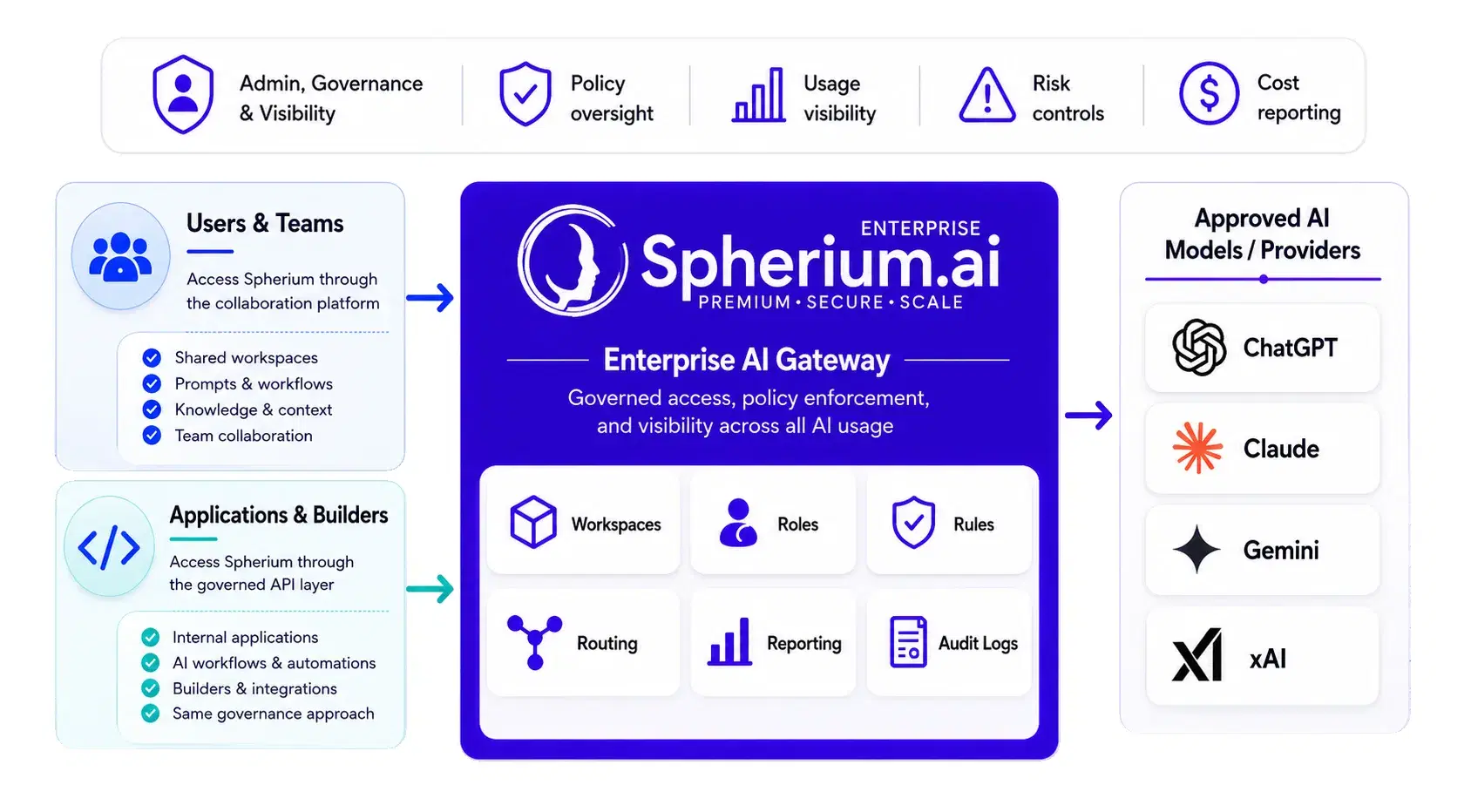
People use the collaboration platform. Applications connect through the API. Spherium applies workspaces, roles, rules, routing, reporting, and audit logs before approved models respond.
Short answers for teams evaluating Spherium as a practical path for approved AI access, collaboration, model choice, reporting, and scale.
Yes. Many organizations can begin with one team, workspace, or department, then expand as adoption patterns become clearer.
No. Spherium is designed to support practical rollout: add users, create workspaces, apply rules, view reports, then expand across departments.
Spherium provides complimentary onboarding assistance for rollout setup. Exact timing depends on user setup, workspace needs, rules, and reporting decisions.
Yes. Workspaces can organize AI work around teams, departments, clients, projects, or use cases.
Yes. Spherium helps organizations start with a focused rollout and add workspaces, roles, models, rules, and reporting as adoption grows.
Spherium is model-agnostic. The goal is to give teams approved access to preferred models through a managed environment.
Spherium supports multi-model access across leading providers such as OpenAI, Anthropic Claude, Google Gemini, and xAI Grok.
Yes. Applications and builders can use Spherium APIs where enabled while remaining aligned with platform rules, routing, and reporting.
Admins can manage approved model access by workspace, role, and platform configuration where supported.
Yes. The Reporting Hub helps leaders review adoption, usage, model activity, workspace activity, and cost signals.
Copilot can be useful inside the Microsoft ecosystem. Spherium provides a gateway for approved model access, workspaces, rules, routing, and reporting across broader AI use cases.
Teams can start with a 10-Day Free Trial or request a guided walkthrough before adding users, creating workspaces, applying rules, and viewing reports.
Plan your AI rollout
Give your teams an approved way to use AI, then expand with workspaces, model access, reporting, and rules as adoption grows.